


Studio Workflow Efficiency: Why Systems, Not Effort, Are What Let Photography Studios Scale
Running a photography studio without clear systems is exhausting. When your day is driven by open browser tabs, sticky notes, and a mental checklist that never quite empties, it becomes nearly impossible to stay ahead of your own business.
Missed steps, delayed responses, and frustrated clients are not signs of carelessness. They are symptoms of disorganization. No amount of effort or good intentions fixes a process that was never actually built.
As studios grow and take on more complex projects, scattered systems start to break down in visible ways. Multi-step jobs, multiple brands, and overlapping timelines all demand structure. Without it, even experienced, talented studios can feel overwhelmed by their own success. Efficiency does not come from working harder. It comes from building better systems, and this guide walks through exactly how to do that using workflow structure and ShootQ.
Why Studio Workflow Breaks Down Without a Formal System
Every photography job follows a series of stages, whether that process is written down anywhere or not. A lead comes in, a proposal goes out, a booking gets confirmed, production happens, and delivery wraps things up. That sequence exists in every studio's operations, whether it is intentional or not.
The problem is that many studios never formalize this process. When the workflow only lives in your head or scattered across your inbox, consistency disappears the moment volume increases. One client gets a fast, polished experience because you happened to have a clear day. Another client gets a delayed, inconsistent experience because you were juggling three other jobs at the same time. Neither outcome reflects your actual skill or care as a photographer. Both reflect the absence of a repeatable system.
This inconsistency compounds as a studio grows. A single missed step is a minor annoyance when you have two active clients. That same missed step, repeated across fifteen or twenty active clients, becomes a pattern that erodes trust, creates rework, and adds a constant undercurrent of stress to every workday.
How to Build a Real Studio Workflow
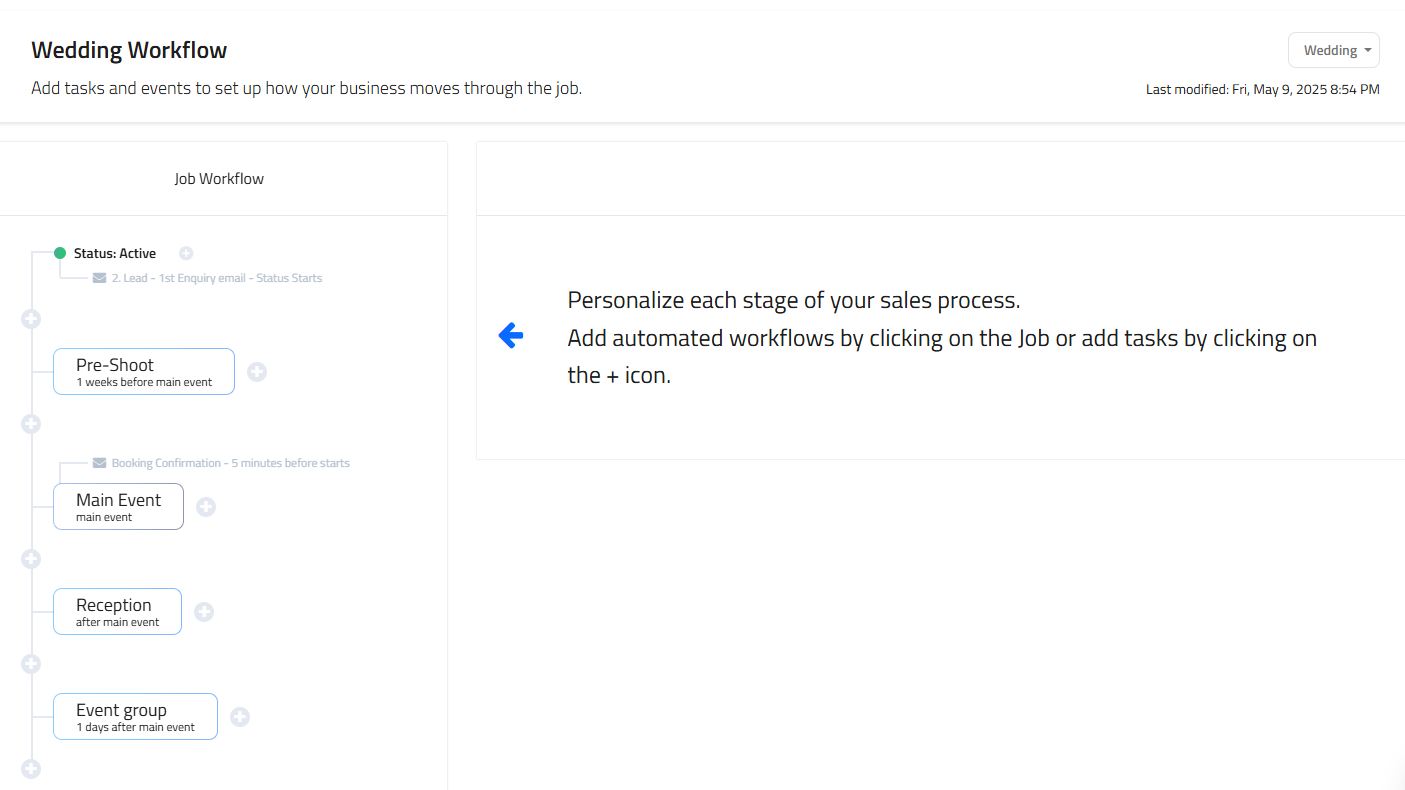
A real workflow starts with a lead and moves through proposal, booking, production, and delivery. Each stage includes specific actions that need to happen at the right time, in the right order, regardless of who the client is or how busy the studio happens to be that week.
Define Every Stage of the Job Pipeline
The first step in building a real workflow is writing down what actually needs to happen at each stage of a project. That includes the initial inquiry response, the proposal and pricing conversation, contract and deposit collection, the production or shoot phase itself, and the final delivery and closeout. When those steps are clearly defined once, in writing, nothing gets left to memory or guesswork.
Make the Pipeline Visible
Job pipelines make the entire process visible in a way that memory never can. Instead of guessing what needs attention today, you can look at a pipeline and see exactly where each project stands and what comes next for it. This clarity allows you to prioritize work intelligently, respond to clients with confidence instead of hesitation, and keep every project moving forward without the low-grade anxiety of wondering what you might have forgotten.
Standardize What Repeats
Not every part of a job is unique to that client. Contract language, standard email responses, questionnaire templates, and delivery checklists are largely the same from one job to the next. Standardizing these repeatable elements means you are not reinventing the wheel for every new booking, and it means every client receives the same baseline level of professionalism regardless of how many other projects are competing for your attention that month.
ShootQ Tools That Eliminate Chaos
ShootQ is built to systematize complex studio operations, turning scattered tasks and mental to-do lists into structured workflows that run consistently behind the scenes, without requiring constant manual oversight.
Workflow templates allow you to define each step of your process once and reuse it for every job. Rather than rebuilding your client journey from scratch every time a new project comes in, you set it up once inside ShootQ and let it apply automatically to each new booking. This ensures that every client receives the same level of care and attention, regardless of how busy your schedule becomes in any given week.
Automated reminders replace manual follow-ups. Contracts that need signatures, payments that are coming due, and upcoming production milestones are all prompted automatically rather than depending on you to remember and manually trigger each one. This reduces delays, cuts down on awkward late reminders, and eliminates the mental burden of tracking every deadline yourself across every active client.
Multi-brand task organization keeps everything clearly separated for studios managing more than one brand or vertical. Each brand can have its own workflows, templates, and communication style, all managed within the same overall system. This matters because a studio running multiple brands often has genuinely different processes for each one, and trying to manage that complexity inside a single undifferentiated inbox or spreadsheet quickly becomes unworkable.
Seamless job tracking ties everything together in one place. Emails, documents, payments, and tasks are linked directly to the specific project they belong to, creating a complete and reliable record that is easy to reference at any time, whether you need to check something yourself or answer a client's question on the spot.

What Real Studio Efficiency Looks Like Day to Day
When your studio is organized, work feels fundamentally different on a daily basis. You are no longer reacting to problems as they surface. You are operating with intention, because the system is telling you what needs attention instead of leaving that discovery to chance.
This shift creates a chain reaction that shows up across the entire business. Organization leads to efficiency, because you are not spending time reconstructing information that should already be in one place. Efficiency leads to faster turnaround times, because the administrative overhead around each job shrinks. Faster turnaround and consistent follow-through lead to clearer communication with clients, because they are getting timely, accurate updates instead of delayed or inconsistent ones. Clear communication builds trust, and trust is what leads to better client experiences, stronger reviews, and more referrals down the line.
Instead of feeling behind, a studio running on real systems feels in control, even during its busiest stretches.
The Measurable Results of a Streamlined Studio
Studios that move from disorganized, memory-based systems to structured workflows tend to see the benefits quickly and clearly. Mistakes drop, because fewer steps depend on someone remembering to do them manually. Responses get faster, because the information needed to respond is already organized and accessible instead of scattered across five different places. Mental clutter decreases, because the studio owner or team is no longer carrying an ever-growing list of half-remembered tasks in their head.
Better organization also creates room to grow without introducing chaos. A studio with solid systems can take on more clients, more complex projects, or an additional brand without those additions destabilizing everything else. More efficiency frees up time and energy that would otherwise be spent on administrative firefighting, and that reclaimed capacity can go toward actual creative work or toward strategic growth. A studio that feels in control of its operations is a studio that can scale confidently, rather than one that grows reluctantly out of necessity while barely keeping up.
Streamlining Is the Only Way to Scale
As a studio grows, complexity increases by default. More clients, more brands, and more moving pieces all demand systems that can actually keep up with that growth, rather than systems that were only ever designed to handle a smaller, simpler operation.
Streamlining is not optional if the goal is to scale sustainably. It is the foundation that supports growth without burnout, and without the kind of chaos that eventually damages client relationships or forces a studio to turn away work it would otherwise be capable of handling.
ShootQ provides the structure studios need to move from disorganized to efficient, systematizing the parts of the business that should never have depended on memory or manual tracking in the first place. When your systems are solid, everything else, from client satisfaction to your own day-to-day stress level, tends to fall into place around them.
Frequently Asked Questions
Why does a photography studio need a formal workflow instead of just staying organized personally?
Personal organization depends on memory and attention in the moment, which works at low volume but breaks down as a studio takes on more clients and more complex projects. A formal workflow removes that dependency by defining each step of a job once and applying it consistently, so the studio's operations do not depend on any one person remembering everything correctly every time.
What does ShootQ actually do for a photography studio's workflow?
ShootQ turns a studio's client journey into a structured, repeatable system by centralizing workflow templates, automated reminders, job tracking, and communication in one connected platform. Instead of managing each job's steps manually across email, sticky notes, and memory, the studio can rely on ShootQ to prompt the right actions at the right time.
Can ShootQ handle a studio that manages multiple brands?
Yes. ShootQ includes multi-brand task organization, which allows each brand under a studio's umbrella to have its own workflows, templates, and communication style, while still being managed within a single unified system. This is particularly useful for studios where different brands or verticals require genuinely different client experiences.
How do automated reminders in ShootQ reduce missed deadlines?
ShootQ can automatically prompt contracts, payments, and upcoming milestones as they come due, rather than requiring a studio owner or team member to manually track and trigger each one. This removes a significant source of missed deadlines, since the system surfaces what needs attention instead of relying entirely on someone remembering it.
Does ShootQ keep client communication and documents in one place?
ShootQ ties emails, documents, payments, and tasks directly to the specific job they belong to, creating a complete record for each client that is easy to reference at any time. This means a studio does not need to search across multiple separate tools to reconstruct what has happened on a given project.
How does a job pipeline in ShootQ help a studio prioritize its work?
A job pipeline makes the status of every active project visible at a glance, showing exactly where each one stands and what comes next. Instead of guessing which client needs attention first, a studio can look at the pipeline and prioritize based on actual, current status rather than memory or assumption.
Is ShootQ worth adopting for a smaller studio, or only for studios that have already scaled?
While ShootQ's advantages become most obvious once a studio is managing significant volume or multiple brands, building workflow structure early tends to make future growth much smoother. A smaller studio that adopts structured workflows from the start avoids the disruptive process of trying to retrofit systems onto a business that has already outgrown its informal processes.