


Why Email Can't Run Your Photography Studio (And What to Use Instead)
Email was never designed to manage complex photography businesses. It was built for conversations, not contracts, not proposals, and definitely not multi-step projects with deadlines and deliverables spread across weeks or months.
Yet many studios still rely on their inbox as the central hub for everything. Leads live in threads. Contracts are buried in attachments. Follow-ups are based on memory rather than any actual system. As volume increases, things start slipping. Messages get missed. Clients wait longer than they should. Opportunities quietly disappear, often without the studio ever realizing exactly where things went wrong.
When your studio grows beyond a handful of shoots a month, email becomes fragile. It slows communication, creates confusion, and leaves far too much room for error in a business where details actually matter. This guide breaks down why inbox-based studio management stops scaling, how to take real inventory of your workflow, and how ShootQ replaces inbox chaos with a system built specifically for complex, multi-step photography projects.
Why Email Fails as a Studio Management System
Email is genuinely good at one thing: back-and-forth conversation. It is not good at holding structured, multi-stage information over the life of a project that might run for months. A wedding booking, a commercial shoot with multiple deliverables, or a branding session with a long post-production timeline all involve more moving parts than a simple thread of messages can reliably track.
The deeper problem is that email gives you no visibility into your business as a whole. You can read one thread at a time, but you cannot easily see, at a glance, how many active jobs you have, what stage each one is in, or what needs your attention today versus what can wait. That lack of visibility is not a minor inconvenience. It is the root cause of most of the specific breakdowns studios experience as they grow.
Take Inventory of Your Full Studio Workflow
Before you can fix the problem, you have to see the full scope of what your inbox is actually trying to manage, because the issue is rarely just "too many emails." It is that a genuinely complex process is being forced into a tool that was never built to hold it.
Map the Stages Every Job Actually Goes Through
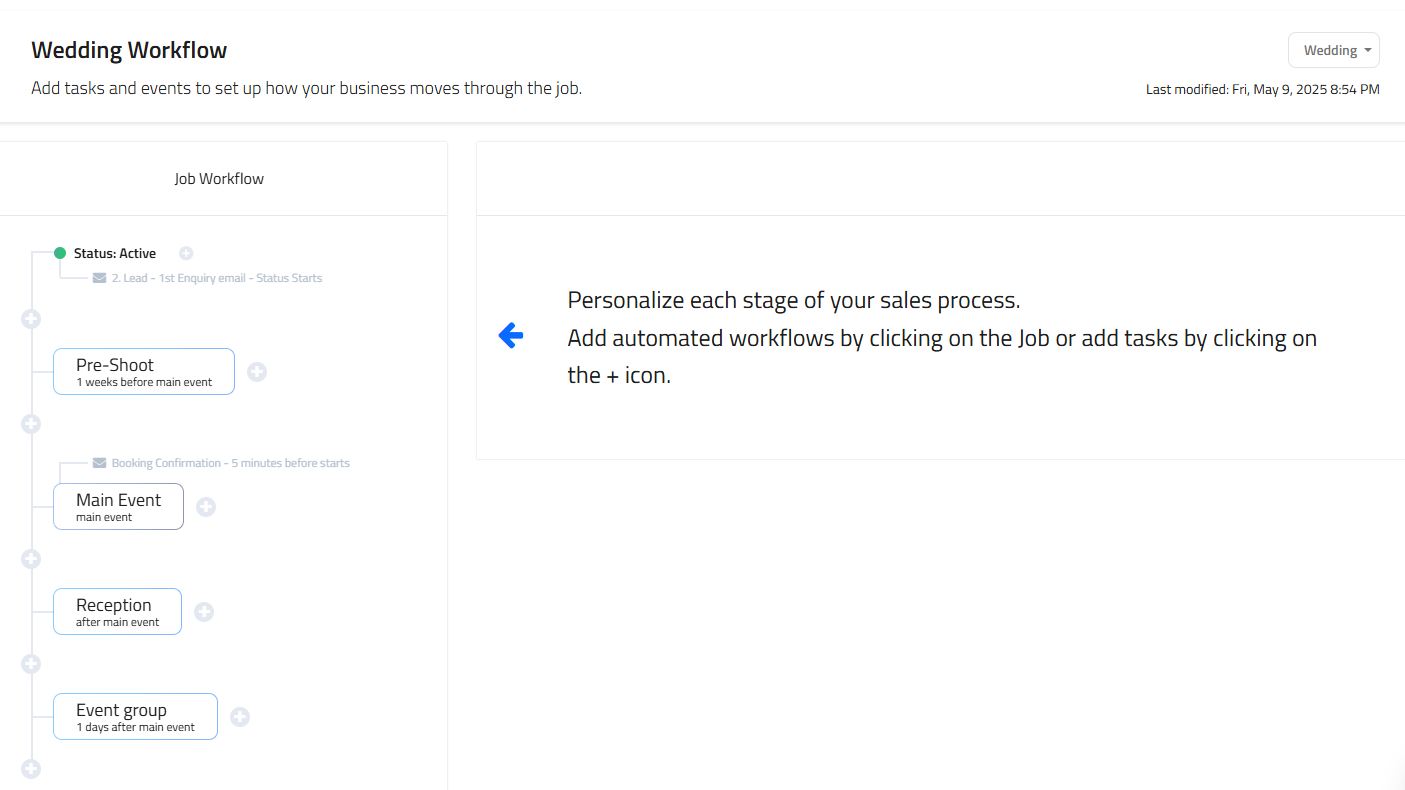
Most photography studios follow a similar path for every job, whether or not that path has ever been written down. It starts with an inquiry. That inquiry leads to a proposal. The proposal includes a contract. Then comes scheduling, followed by the actual session, post-production, delivery, and a final follow-up. Each of these stages is a distinct phase with its own requirements, and treating them as one undifferentiated stream of email traffic is where the trouble begins.
Recognize the Touchpoints Hiding Inside Each Stage
Each stage includes multiple touchpoints: emails, documents, invoices, reminders, and status updates. When all of this lives in email threads, important details get scattered quickly, because a single job might generate a dozen or more separate messages, each containing one small piece of the full picture. No single thread tells the whole story, which means reconstructing a job's status requires piecing together fragments from multiple places.
Identify the Bottlenecks This Creates
Common bottlenecks start to appear once a studio hits any meaningful volume. Inquiries sit unanswered because they are mixed in with unrelated messages and easy to lose in a crowded inbox. Proposals are sent but never followed up on, because there is no system prompting that follow-up to happen. Contracts are signed but not logged anywhere central, so nobody can quickly confirm their status without searching. Scheduling details are confirmed in one email while changes get mentioned in a completely different one, creating a real risk that outdated information is the version someone acts on.
Email does not give you visibility, and without visibility you cannot quickly see what stage each job is in or what needs attention today. That lack of clarity slows your response time, increases your day-to-day stress, and makes every part of running the studio feel harder than it should.
How to Build That Workflow Inside ShootQ
ShootQ is designed to replace inbox chaos with structure. Instead of forcing complex, multi-step projects into email threads that were never meant to hold them, ShootQ gives each job a clear, trackable workflow from the first inquiry through final delivery.
Automated lead responses ensure inquiries never sit unanswered. Clients receive immediate confirmation and clear next steps the moment they reach out, even when you are busy shooting, editing, or simply offline. This sets expectations early, keeps momentum moving during the critical first hours after an inquiry, and reduces the odds that a promising lead goes cold while waiting on a reply.
Branded booking pages create a consistent, professional experience for every client. Clients move from proposal to contract to invoice in one guided flow rather than a scattered series of separate emails and attachments. There is no confusion about where to click, what to sign, or what step comes next, which reduces friction at exactly the point in the relationship where a smooth experience matters most.
Proposals, contracts, and invoices are connected to one another. Each step triggers the next automatically, eliminating manual follow-ups and significantly reducing the risk of a missed action, like a signed contract that never gets invoiced or a proposal that never gets a follow-up nudge. Everything related to the job lives in one place, tied directly to the client and the specific project.
Multi-brand settings keep operations clean for studios managing more than one vertical or brand. Each brand can have its own templates, workflows, and communication style, while still being managed under a single unified system. This matters because forcing genuinely different brands or business lines into one generic process usually creates more confusion than it solves, whereas separating them within the same platform keeps everything organized without duplicating your entire toolkit.
Operate From Your Dashboard, Not Your Inbox
When your studio runs from a dashboard instead of an inbox, everything about the day-to-day experience changes.
Every job becomes trackable in a real, visible way. You can instantly see which leads are new, which proposals are currently out for review, and which clients are fully booked and moving toward their session date. There is no searching through old threads and no guessing about where things stand.
Every touchpoint gets logged automatically. Emails, contracts, payments, and notes are tied directly to the job they belong to, which creates a complete history that is easy to reference at any time and effectively impossible to lose, unlike a scattered inbox where one misplaced or deleted email can erase important context.
Response times improve because information is centralized in one place instead of spread across multiple tools and threads. When you know exactly where each project stands without having to reconstruct it from memory, your replies become faster and more confident. Clients notice that confidence, and it directly influences their trust in you and, often, their decision to book.
Most importantly, your mental load decreases significantly. You are no longer trying to remember what needs to happen next for each of your active clients. The system shows you, which frees up mental space for the creative and strategic work that actually grows the business.
Why Inbox Chaos Holds Studios Back
Studios that rely on email alone often feel busy without feeling productive. A huge amount of time gets spent managing conversations and searching for information instead of actually running the business or doing the creative work that brought most photographers into this field in the first place. Growth starts to feel stressful rather than exciting, because every new booking adds more complexity to a system that was already straining under its existing load.
Systems create stability in a way that willpower and good intentions never can. They allow a studio to scale without sacrificing professionalism, responsiveness, or the quality of the client experience, even as the number of active projects climbs.
Ditch Inbox Chaos and Stay in Control
Email will always be part of how a studio communicates, but it should never be the system actually running that studio. Complex, multi-step workflows need structure, visibility, and automation, none of which an inbox can genuinely provide on its own.
With ShootQ, your processes run consistently regardless of how busy a given week gets. Your projects stay organized in a way you can see and trust. Your clients experience clarity from the very first inquiry all the way through final delivery, which builds the kind of trust that leads to referrals and repeat business.
Ditch inbox chaos. When your systems are solid, your studio stays in control, even as it grows.
Frequently Asked Questions
Why is email a poor system for managing a photography studio's workflow?
Email is designed for conversation, not for tracking multi-stage projects with contracts, invoices, and deadlines. It offers no centralized visibility into where a job stands, which means important details get scattered across separate threads and attachments as a studio's volume increases.
How does ShootQ replace the inbox as a studio's operating system?
ShootQ gives every job a trackable workflow that connects inquiries, proposals, contracts, and invoices in one system, rather than relying on scattered email threads. Automated lead responses, connected documents, and a centralized dashboard mean a studio owner can see the status of every active job without searching through email.
Can ShootQ automatically respond to new client inquiries?
Yes. ShootQ can send automated lead responses so that inquiries receive immediate confirmation and next steps, even when the studio owner is busy or offline. This keeps momentum moving during the critical early window after a lead comes in, when response speed often affects whether that lead ultimately books.
Does ShootQ connect contracts, proposals, and invoices to each other?
ShootQ links proposals, contracts, and invoices so that completing one step can trigger the next, reducing the need for manual follow-up and lowering the risk of a missed action, such as a signed contract that never gets an invoice sent behind it.
How does ShootQ help studios that manage multiple brands?
ShootQ's multi-brand settings allow each brand under a studio to have its own templates, workflows, and communication style while still being managed within a single unified system. This keeps distinct brands or verticals organized without forcing them into one generic process or requiring separate software for each.
What does a branded booking page in ShootQ actually do for clients?
A branded booking page guides clients through a consistent flow from proposal to contract to invoice, removing confusion about what to do next at each step. This creates a more professional, polished experience for the client compared to navigating a series of separate emails and attachments.
Is ShootQ only worth using once a studio has outgrown email entirely?
Studios of any size can benefit from ShootQ, but the advantages become especially clear once a studio has enough active jobs that email alone can no longer provide reliable visibility. Adopting a structured system before that breaking point tends to make the eventual growth in volume far smoother than trying to retrofit organization onto an already overwhelmed inbox.