
Quick Answer:
Generic business software handles general tasks like invoicing or scheduling, but it isn't built around the specific way a photography studio actually works: packages, shoot dates, galleries, and contracts tied to a single booking. A photography-specific CRM like ShootQ is built around that exact workflow, which is why it typically requires less customization and less manual workaround than adapting general-purpose software to fit a photography business.
Once a studio decides it needs real business software instead of spreadsheets, the next decision is which kind. General-purpose CRMs and business management platforms are everywhere, built to serve almost any small business, from consultants to contractors to retail shops. On paper, many of them can technically handle scheduling, invoicing, and client records. In practice, adapting a generic tool to a photography workflow usually means a lot of manual customization to make up for gaps the software was never designed to fill.
This post compares the two approaches directly: what a generic business tool can do out of the box, where it falls short for a photography studio specifically, and where a purpose-built CRM like
ShootQ closes that gap.
What Does Generic Business Software Actually Get Right?
To be fair to general-purpose tools, they're not without value. Most handle basic
invoicing, a shared calendar, and simple client records reasonably well, and for a business with straightforward transactional relationships, that's often enough. The issue isn't that generic software is bad. It's that a photography studio's workflow has specific requirements most generic tools weren't designed around.
Where Does Generic Software Fall Short for Photography Studios Specifically?
- No native concept of a photography package, with pricing, deliverables, and add-ons bundled together.
- No built-in gallery delivery, meaning a separate tool is needed just to get finished images to clients.
- Contract templates aren't built around photography-specific terms like usage rights, model releases, or shoot-day cancellation policies.
- Booking forms don't naturally capture photography-relevant details like location, shoot type, or second-shooter needs.
- Reporting is generic revenue and task tracking, not built around bookings, packages, or seasonal shoot volume.
None of these gaps are unsolvable in a generic tool. They're solvable with enough custom fields, workarounds, and additional connected apps. But every one of those workarounds is time spent building something a photography-specific CRM already includes.
How Does ShootQ Handle These Same Needs Natively?
- Packages are a core object in ShootQ, not a workaround, with pricing, deliverables, and add-ons built in from the start.
- Gallery delivery is native, so there's no separate tool needed to get finished images to clients.
- Contract templates are built around photography-specific language and merge fields from day one.
- Booking forms are designed to capture the details a photography studio actually needs, like shoot type and location.
- Reporting reflects booking volume, package performance, and seasonal trends relevant to a photography business specifically.
ShootQ vs. Generic Business Software: A Feature Comparison
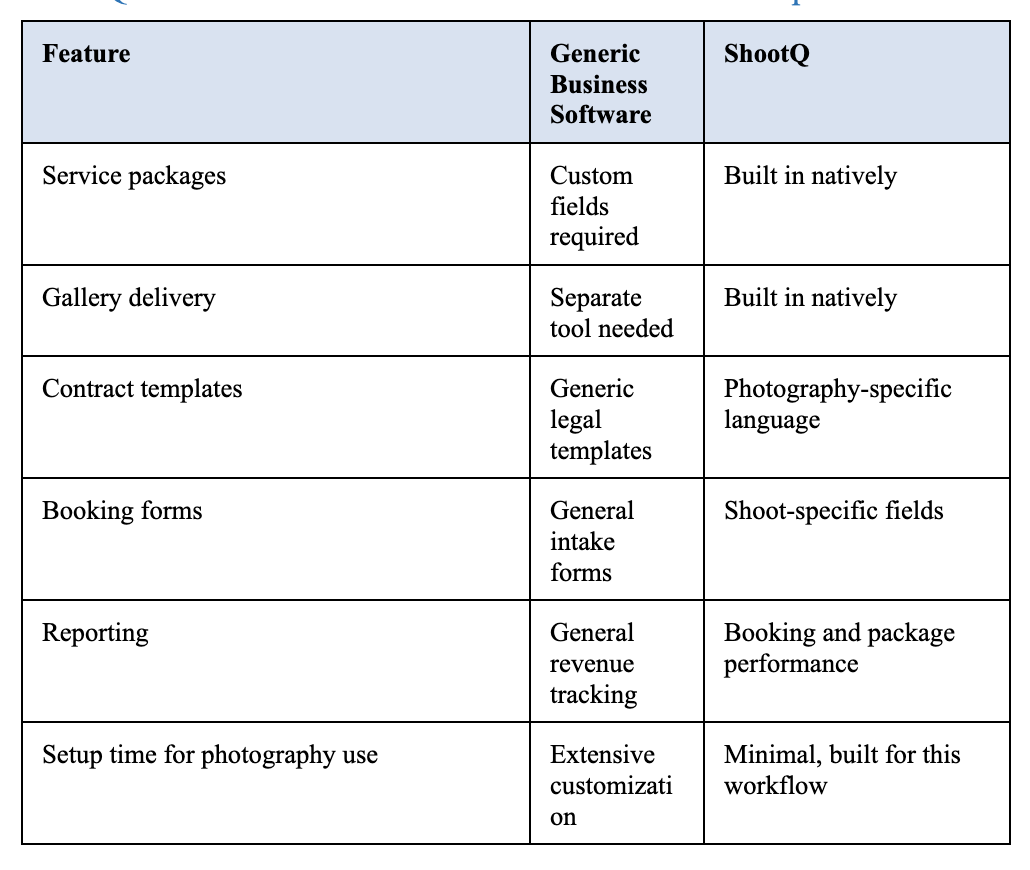
The pattern across every row is similar: generic software can often be configured to approximate what a photography CRM does natively, but that configuration takes time, and it usually stays a workaround rather than becoming a genuinely native fit.
When Might Generic Software Still Make Sense?
For a studio that's also running a substantially different side business, or one that needs deep integration with accounting or enterprise tools a photography-specific platform doesn't support, a generic tool might still be the right call, sometimes paired with a lighter photography-specific tool for just the shoot-related workflow. For a studio whose primary business is photography, though, the case for a purpose-built system is usually straightforward once the setup time and workaround cost of a generic tool are actually counted.
What Does the Setup Time Difference Actually Look Like?
It's worth being concrete about what customization means in practice. Adapting a generic CRM to handle photography packages typically involves building custom fields for deliverables, manually formatting a contract template from a legal boilerplate, and either connecting a third-party gallery tool or building a workaround using generic file storage. Each of these is solvable individually, but together they can turn a setup that should take an afternoon into a project spanning several weeks, often revisited repeatedly as gaps get discovered mid-use rather than during initial setup.
A photography-specific CRM compresses that same setup because the underlying structure, packages, photography contract language, and gallery delivery, already exists. The studio owner's setup time goes into entering their specific pricing and branding, not into building the underlying framework from scratch.
What Should You Weigh Before Switching or Choosing a Platform?
- How much of your current workflow already depends on custom workarounds in a generic tool.
- Whether gallery delivery and photography-specific contracts are handled natively or require a separate connected tool.
- How much setup and customization time a platform requires before it actually fits how your studio operates.
- Whether the reporting available actually reflects the metrics a photography business cares about, like package performance and seasonal booking trends.
How Does This Decision Change as a Studio Grows?
A very new studio booking only a handful of clients a year might reasonably start with a generic, lightweight tool simply because the workaround cost is low at that volume. As booking volume grows, though, the workarounds that were tolerable at low volume start compounding: more custom fields to maintain, more manual corrections on invoices, more time spent explaining gallery access outside the main system. The point at which a photography-specific CRM becomes clearly worth it usually arrives earlier than most studio owners expect, often around the same time a studio starts feeling like admin work is competing directly with shooting and editing time.
What Does Switching Actually Involve?
Moving from a generic platform to a photography-specific CRM typically means exporting existing client and booking records, then rebuilding packages, contracts, and automation using the native structure a purpose-built platform already provides. This is usually less work than it sounds, precisely because the destination platform doesn't require the same custom-field workarounds the generic tool did. Most studios find that rebuilding packages and contracts in a system designed for them takes less time than the original setup did in the generic tool.
See what a photography-specific CRM feels like.
Start your free
ShootQ trial and experience packages, contracts, and gallery delivery built for exactly how a photography studio works, no credit card required.
Frequently Asked Questions
Is a photography-specific CRM worth it over general business software?
For a studio whose primary business is photography, usually yes. The time saved from not having to build workarounds for packages, contracts, and gallery delivery tends to outweigh whatever general-purpose flexibility is given up.
Can generic business software handle photography contracts?
It can hold contract templates, but they're typically generic legal templates rather than built around photography-specific terms like usage rights or shoot-day cancellation policies, so significant customization is usually needed.
Does ShootQ integrate with accounting software?
Photography-specific CRMs commonly offer integrations or export options for accounting purposes. Check current integration options directly, since these can change over time.
What's the biggest workflow gap in generic software for photographers?
Gallery delivery is usually the most noticeable gap, since generic business tools rarely include a way to deliver, organize, and sell finished images, requiring a separate dedicated tool.
Is switching from generic software to a photography CRM difficult?
Most studios can migrate core client and booking data during setup, similar to switching from a spreadsheet. The specific process depends on what the generic platform allows you to export.
Can I use generic software for some tasks and ShootQ for others?
Some studios do run a hybrid setup temporarily during a transition, but maintaining two systems long term usually reintroduces the same fragmentation problem a single connected CRM is meant to solve.